
All in One PDF Tools – 15 Powerful PDF Tools for WordPress
Turn your WordPress website into a complete PDF utility platform with the All in One PDF Tools WordPress Plugin.
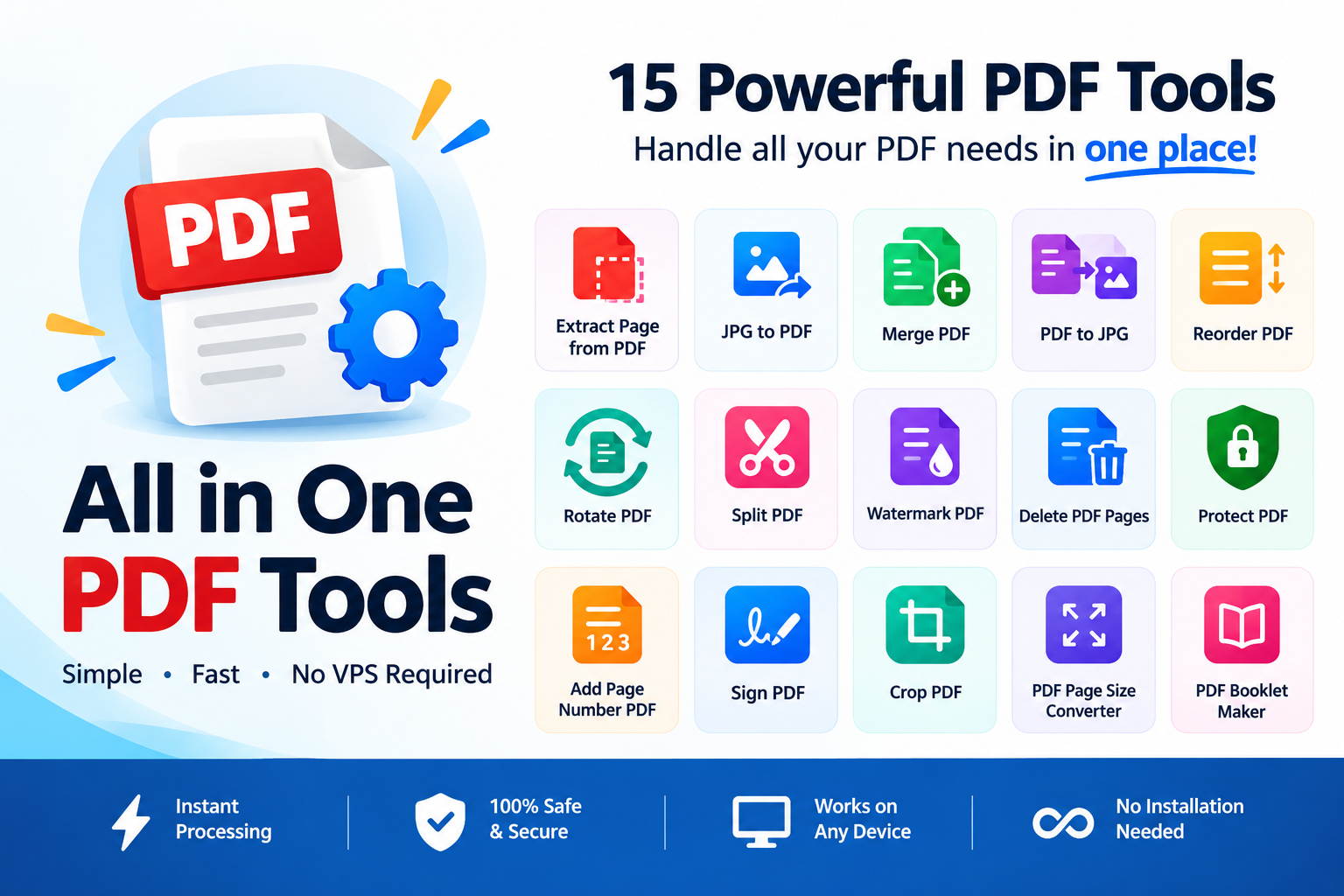
This powerful plugin brings 15 essential PDF tools together in one convenient package, allowing your website visitors to work with PDF files directly from your WordPress website.
Whether you want to create a PDF tools website, add useful document utilities to an existing website, or provide PDF functionality to your customers, this plugin gives you a ready-to-use collection of essential PDF tools without requiring a VPS.
🚀 15 PDF Tools in One Plugin
The plugin includes the following tools:
1. Extract Page from PDF
Extract selected pages from an existing PDF document and create a new PDF containing only the pages you need.
Useful for: extracting chapters, specific documents, selected pages, forms, invoices, reports, and other sections from larger PDF files.
2. JPG to PDF
Convert JPG/JPEG images into PDF documents.
Users can upload images and convert them into a convenient PDF format, making it useful for documents, scanned images, photographs, forms, and other image-based content.
3. Merge PDF
Combine multiple PDF files into a single PDF document.
This is useful when users have separate reports, documents, invoices, forms, or other PDF files that need to be combined into one file.
4. PDF to JPG
Convert PDF pages into JPG images.
Users can convert PDF pages into image files for easier sharing, publishing, previewing, or use in other applications.
5. Reorder PDF
Change the order of pages inside a PDF document.
Users can rearrange pages into the desired sequence before generating the final PDF.
6. Rotate PDF
Rotate PDF pages when they are displayed in the wrong orientation.
This is particularly useful for scanned documents or PDFs containing pages that were scanned sideways or upside down.
7. Split PDF
Split a PDF document into separate PDF files based on the selected pages or page ranges.
This allows users to separate large PDF documents into smaller, more manageable files.
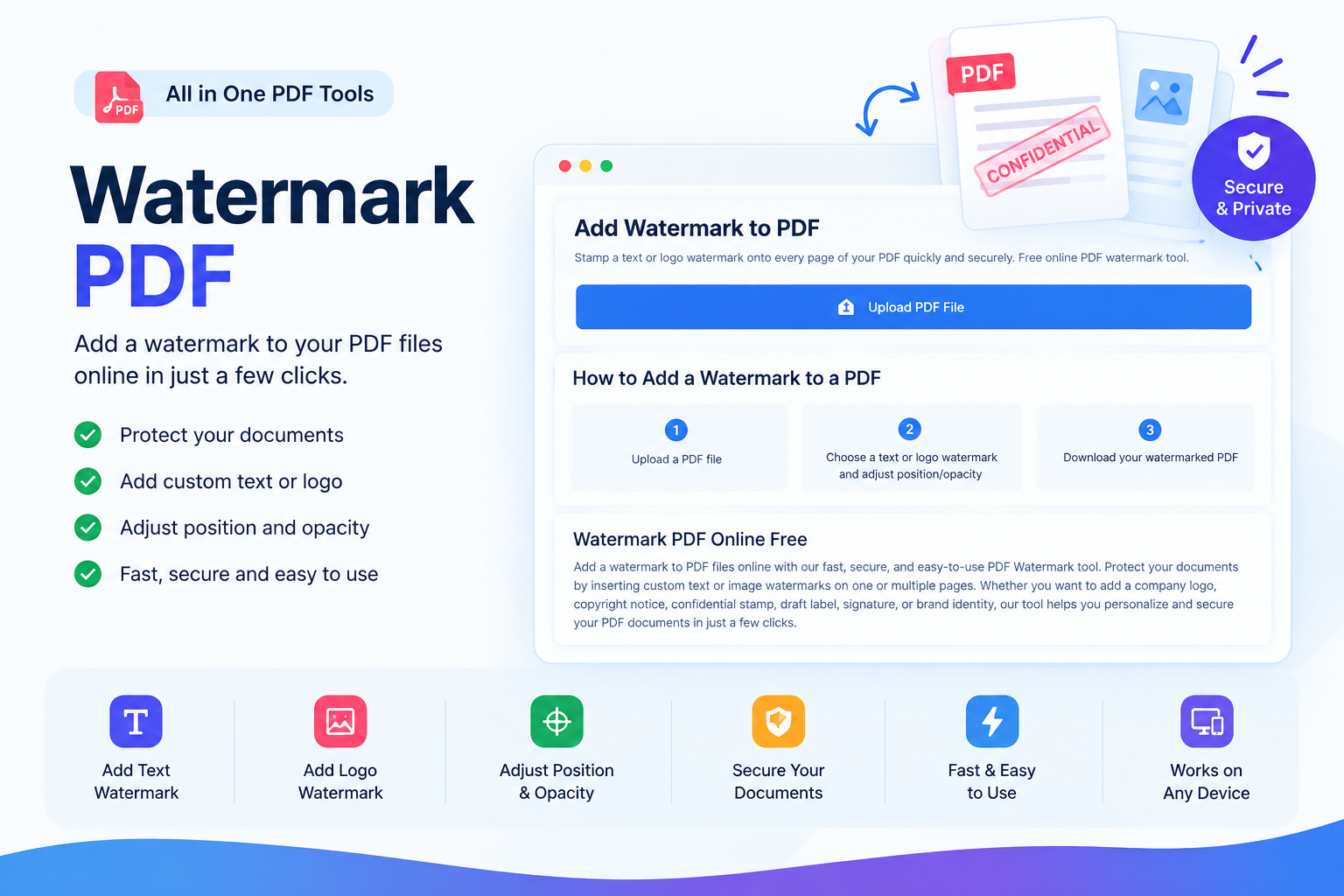
8. Watermark PDF
Add a watermark to PDF documents.
Watermarks can be useful for branding, identification, document classification, or indicating ownership and status.
9. Delete PDF Pages
Remove unwanted pages from a PDF document.
Users can select the pages they don’t need and generate a new PDF without those pages.
10. Protect PDF
Add password protection to PDF files.
This tool is useful when users want to add an additional layer of access protection to their PDF documents.
11. Add Page Number PDF
Add page numbers to PDF documents.
Users can choose the desired page-number position and formatting to make longer documents easier to navigate and reference.
12. Sign PDF
Add a signature to a PDF document.
Users can add a digital-style signature to documents without having to print, manually sign, scan, and recreate the document.
13. Crop PDF
Crop PDF pages to remove unwanted areas around the document.
This can be useful for scanned documents, screenshots, forms, or PDFs containing unnecessary margins and surrounding content.
14. PDF Page Size Converter
Change the page size of a PDF document.
This can be useful when documents need to be prepared for different paper formats or standardized document sizes.
15. PDF Booklet Maker
Create a booklet-style PDF from an existing document.
This tool is useful for preparing documents intended to be printed and folded into booklet format.
💡 Why Choose All in One PDF Tools?
Instead of installing separate plugins for individual PDF functions, you can provide your visitors with 15 PDF utilities through one WordPress plugin.
One Plugin. 15 Tools.
Everything is organized into one complete PDF toolkit, making it easier for website owners to build a useful PDF utility section on their website.
No VPS Required
The plugin is designed to work without requiring a VPS.
This makes it suitable for WordPress websites running on compatible shared hosting environments, subject to the hosting server’s PHP configuration and available resources.
Easy to Add to Your Website
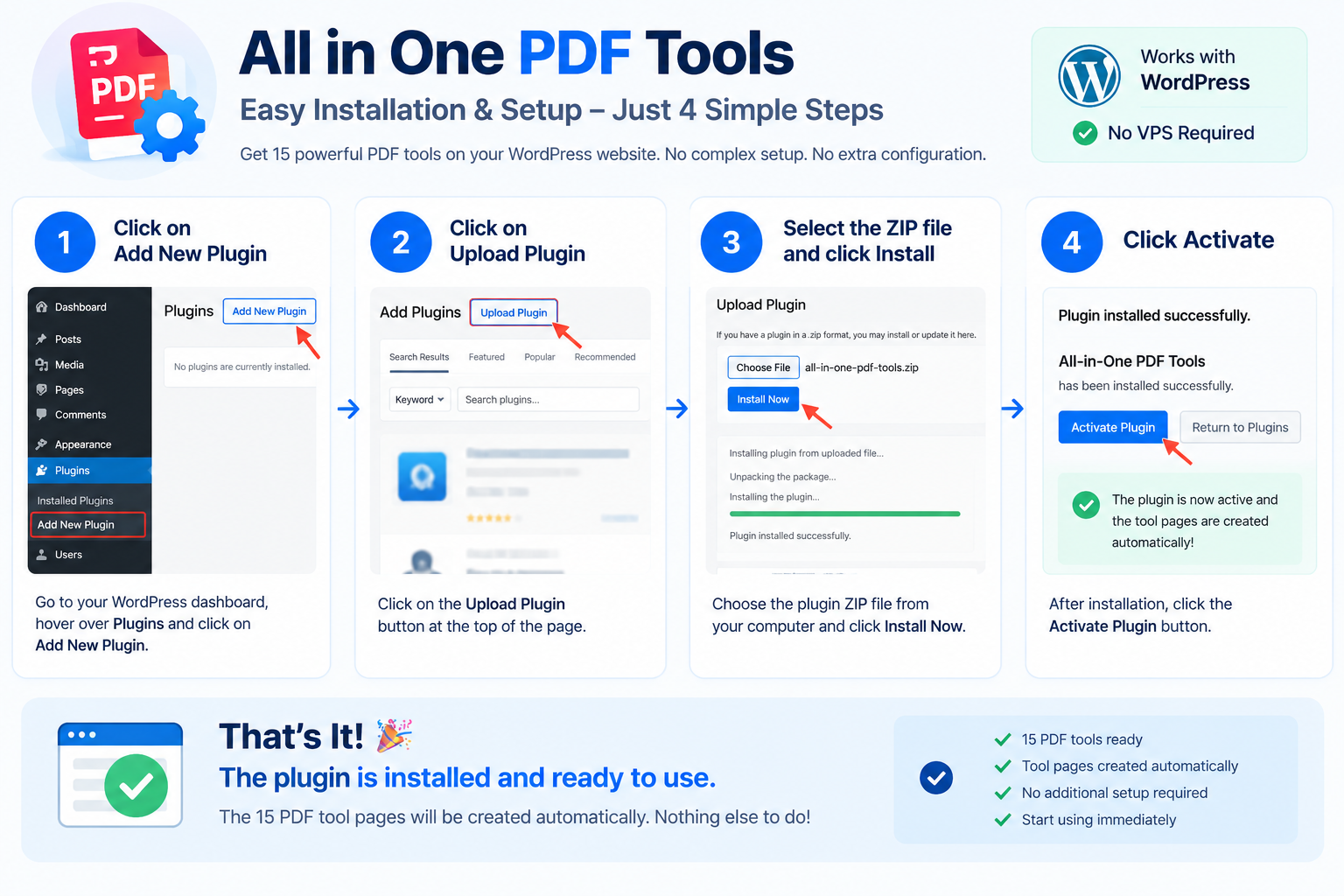
Install the plugin on your WordPress website and add the PDF tools to your website pages using the plugin’s available tool functionality.
You can create dedicated pages for individual tools and build your own PDF tools website or document utility section.
Great for PDF Utility Websites
The plugin is particularly useful for website owners who want to create a website similar to an online PDF tools platform while keeping the tools directly inside WordPress.
⚡ What Can Your Visitors Do?
With the complete toolkit, your visitors can perform common PDF tasks such as:
- Extract selected PDF pages
- Convert JPG images to PDF
- Merge multiple PDFs
- Convert PDF pages to JPG
- Rearrange PDF pages
- Rotate PDF pages
- Split PDF documents
- Add PDF watermarks
- Delete unwanted PDF pages
- Protect PDF documents
- Add page numbers
- Sign PDF documents
- Crop PDF pages
- Change PDF page sizes
- Create booklet-style PDFs
All of these functions are available as part of the same plugin package.
👨💻 Who Is This Plugin For?
Website Owners
Add useful PDF functionality to an existing WordPress website and provide additional value to your visitors.
Developers
Use the plugin as the foundation for building a PDF utility website or integrating PDF functionality into a WordPress project.
Freelancers
Offer PDF functionality to clients without having to develop every PDF tool from scratch.
Agencies
Use the plugin when creating document-processing or utility websites for businesses and organizations.
Online Tool Website Owners
Create a dedicated PDF tools website containing multiple useful document-processing utilities.
Businesses
Provide employees, customers, or website visitors with convenient PDF processing tools.
Educational Websites
Useful for websites dealing with assignments, study materials, reports, forms, certificates, and other PDF documents.
🛠️ Key Features
15 PDF Tools
Get a complete collection of commonly required PDF utilities in one plugin.
WordPress Compatible
Designed specifically for WordPress websites.
No VPS Required
The plugin is designed to operate without requiring a VPS.
Multiple PDF Operations
Perform conversion, organization, editing, protection, signing, and document preparation tasks.
User-Friendly Interfaces
Each tool is designed around a straightforward workflow so visitors can upload their files, configure the required options, and process their documents.
Separate PDF Utilities
Each PDF function can be presented as an individual tool on your website.
Suitable for Tool Websites
Build a complete PDF utility section or a dedicated PDF tools website using WordPress.
Mobile-Friendly Potential
The tools can be incorporated into responsive WordPress pages and themes, although the final appearance and experience can depend on your WordPress theme and website configuration.
🔄 Simple User Workflow
The general workflow is straightforward:
1. Choose a PDF Tool
The visitor selects the required PDF utility.
2. Upload a File
The visitor uploads the PDF or supported image file.
3. Select Options
Depending on the tool, the visitor can select pages, positions, order, size, rotation, watermark, password, or other available options.
4. Process the File
The plugin processes the document according to the selected operation.
5. Download the Result
The visitor receives the processed PDF or image output.
📦 What’s Included?
Your purchase includes the All in One PDF Tools WordPress Plugin package containing the available PDF utilities.
The plugin includes:
- Extract Page from PDF
- JPG to PDF
- Merge PDF
- PDF to JPG
- Reorder PDF
- Rotate PDF
- Split PDF
- Watermark PDF
- Delete PDF Pages
- Protect PDF
- Add Page Number PDF
- Sign PDF
- Crop PDF
- PDF Page Size Converter
- PDF Booklet Maker
🌐 Create Your Own PDF Tools Website
Want to create your own online PDF utility website?
This plugin can provide the foundation for a WordPress-based PDF tools platform.
You can create individual pages such as:
YourWebsite.com/merge-pdf/
YourWebsite.com/split-pdf/
YourWebsite.com/jpg-to-pdf/
YourWebsite.com/pdf-to-jpg/
You can then organize these pages into a central PDF Tools page where visitors can choose the utility they need.
This approach allows you to build your own branded PDF utility website instead of sending visitors to third-party PDF websites.
🔐 Privacy & File Handling
PDF tools commonly process documents that may contain sensitive information. Website owners should therefore configure their WordPress hosting and website environment appropriately and ensure that temporary uploaded and generated files are handled according to their privacy requirements.
Your website should also have appropriate Privacy Policy and Terms & Conditions pages explaining how uploaded files are handled.
Actual processing limits, upload sizes, execution time, and available resources can depend on your hosting provider’s PHP and server configuration.
⚙️ Hosting Requirements
The plugin is designed for WordPress websites that can run compatible PHP-based PDF processing functionality.
VPS: Not required by design.
However, hosting environments can impose limitations such as:
- Maximum upload size
- PHP memory limit
- Maximum execution time
- Maximum POST size
- Available disk space
- Number of simultaneous requests
- Server resource limits
For large PDF files or heavy traffic, your hosting resources may therefore affect processing performance.
📈 Ideal for Building a PDF Tools Business
If you are planning to build an online tools website, this plugin can help you get started with a collection of PDF utilities without developing every tool individually.
You can combine the plugin with:
- WordPress
- WooCommerce
- Elementor
- SEO plugins
- Custom landing pages
- Blog content
- Advertising
- Affiliate marketing
- Membership systems
- Other WordPress functionality
You remain free to create your own branding, website design, pricing model, and business strategy around the tools.
🎯 Why Put 15 Tools Into One Plugin?
Managing individual plugins for every PDF operation can make a WordPress installation unnecessarily complicated.
With an all-in-one approach, you can organize your PDF functionality around a single product and provide visitors with a consistent PDF tools experience.
15 useful tools.
One WordPress plugin.
One complete PDF toolkit.
📋 Product Highlights
| Feature | Details |
|---|---|
| Product Type | WordPress Plugin |
| Category | PDF Tools |
| Number of Tools | 15 |
| VPS Required | No VPS required by design |
| Platform | WordPress |
| PDF Operations | Conversion, editing, organization & protection |
| Suitable For | Websites, businesses, developers, freelancers & agencies |
| Deployment | WordPress installation |
| Output | PDF and/or JPG depending on the tool |
❓ Frequently Asked Questions
Does this plugin require a VPS?
No. The plugin is designed to work without requiring a VPS. However, your hosting provider’s PHP/server limits can affect file size, processing time, and performance.
How many PDF tools are included?
The package currently includes 15 PDF tools.
Can I use it on a normal WordPress hosting plan?
It is designed for WordPress hosting without a VPS. Compatibility and processing capacity depend on your hosting environment and its PHP/server configuration.
Can I create a PDF tools website with this plugin?
Yes. You can use the plugin as the foundation for a WordPress-based PDF tools website and create dedicated pages for the individual utilities.
Can I use the tools on different pages?
Yes, the individual tools can be incorporated into separate WordPress pages so you can create dedicated URLs for different PDF utilities.
Is Elementor required?
No. Elementor is not required for the plugin itself. You can use your preferred WordPress page-building approach, subject to the plugin’s integration options.
Can I customize the design?
The overall appearance can be customized through your WordPress theme and website styling. Additional customization may require CSS or development work depending on the changes you want.
Does it work on mobile devices?
The tools can be presented within responsive WordPress pages. The final mobile experience depends on your theme, page layout, and hosting environment.
Can users process large PDF files?
File-processing capacity depends on your hosting environment, including PHP memory, upload limits, execution time, CPU, and available storage. Hosting limits should be checked before allowing very large files.
Does the plugin provide every PDF function available on large PDF websites?
No. This package focuses on the 15 tools included in the product. Additional PDF functions can be added separately if supported by your implementation.
🚀 Build Your PDF Tools Website Today
Give your WordPress website a complete collection of essential PDF utilities with All in One PDF Tools.
Instead of developing multiple PDF functions separately, get 15 useful PDF tools in one WordPress plugin and create your own branded PDF utility experience.
Extract • Convert • Merge • Reorder • Rotate • Split • Watermark • Delete • Protect • Number • Sign • Crop • Resize • Create Booklets
All in One PDF Tools
15 PDF Utilities. One WordPress Plugin. No VPS Required by Design.
Reviews
There are no reviews yet.